Your Google Calendar, turned into a timesheet and invoice

You already put your client work in your calendar. HourHaul adds it up: hours per client, per week or per month, ready to export to Excel or turn into a printable invoice summary.

Coming soon to the Chrome Web Store See how it works Free for one month’s report · no account needed
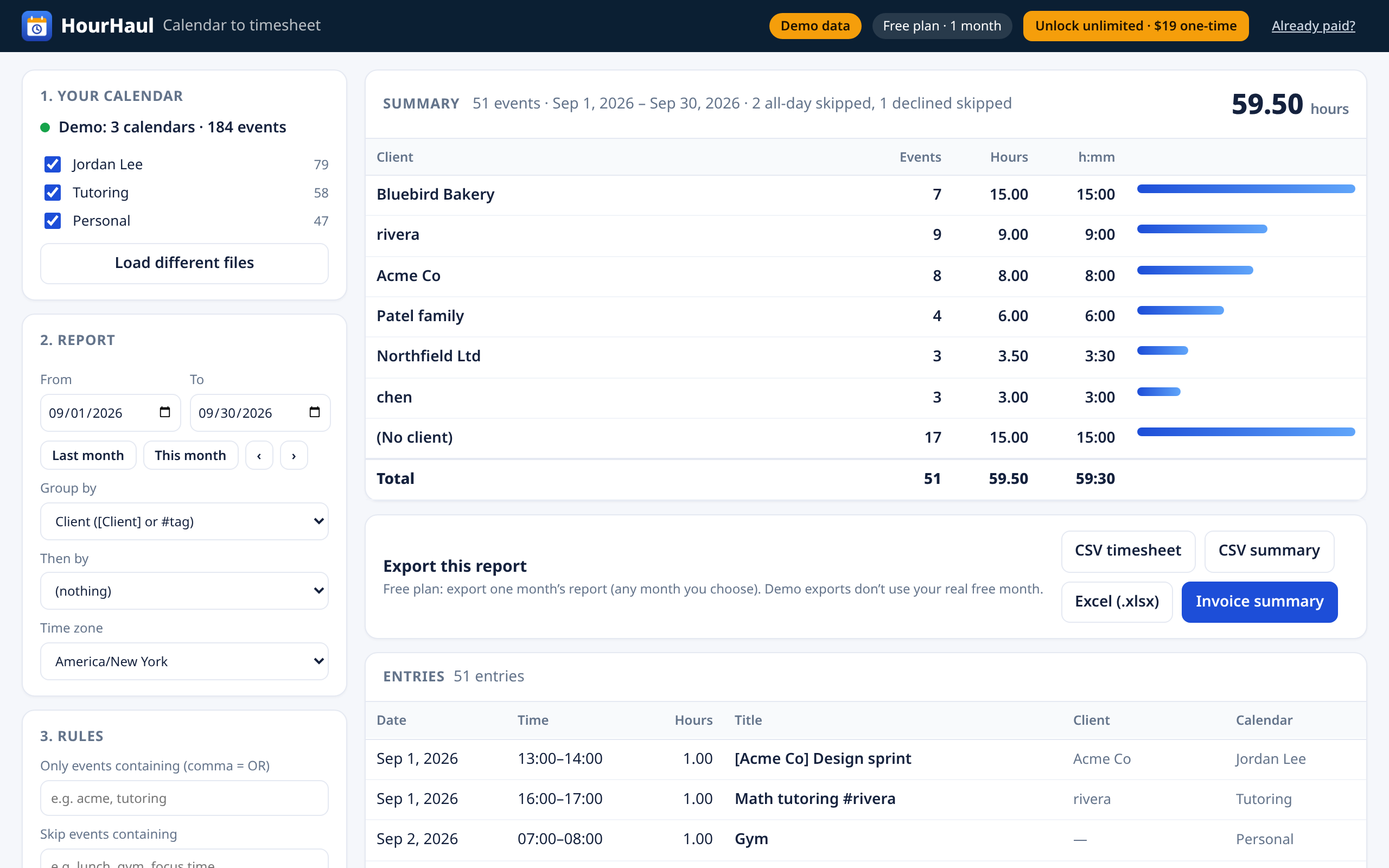
HourHaul showing hours per client for September from a demo calendar, with export buttons for CSV, Excel and an invoice summary

Built for people who bill by the hour

Freelancers, tutors, therapists, coaches, consultants and contractors who already schedule their sessions in Google Calendar.

OptionWhat it takes
Adding up hours by handScroll week by week, copy into a spreadsheet, hope you didn’t miss a session
Time-tracking appsA new account, timers to start and stop, often a monthly fee
Spreadsheet scriptsApps Script setup and maintenance
HourHaulExport your calendar, drop the file in, pick a month. Done.

How it works

Three steps, and your calendar never leaves your computer.

  1. Export your calendar. In Google Calendar, click the gear icon, then Settings → Import & export → Export. A .zip downloads.
  2. Drop it into HourHaul. It reads every calendar in the file, expands repeating events and handles time zones. All-day events are left out unless you want them.
  3. Pick a date range and export. See hours per client, then download a CSV or Excel timesheet, or open the invoice summary and print it to PDF.

Tip: name events like [Acme Co] Strategy call or Tutoring #rivera, and HourHaul groups them by client automatically.

What you get

Hours per client

From [Client] or #tag in event titles. Or group by calendar, keyword, day, week or month, with a second level if you like.

Excel & CSV

A timesheet with date, start, end, hours and client, plus a summary sheet. Opens in Excel, Google Sheets and Numbers.

Invoice summary

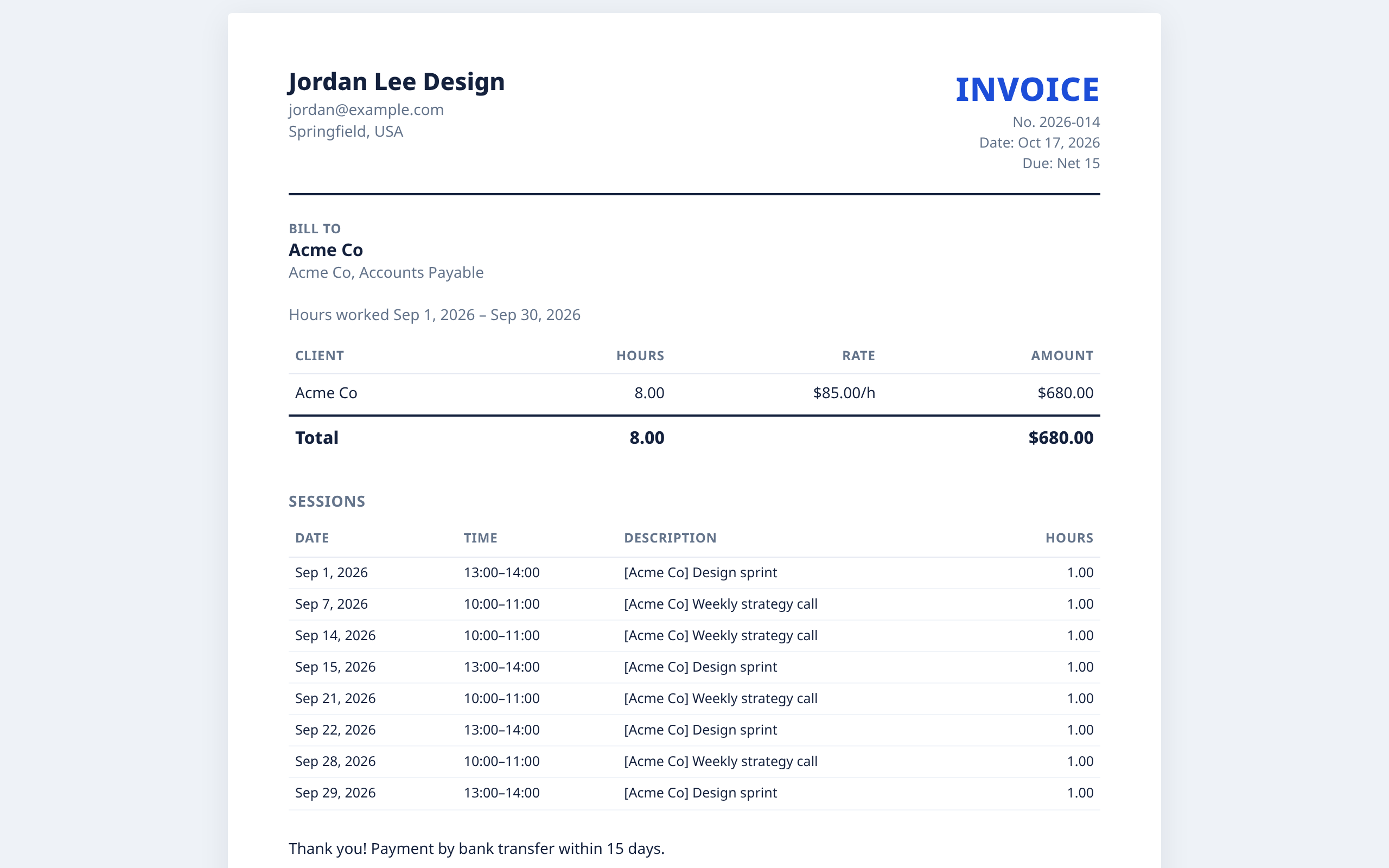
Hours × your hourly rate per client, your name and details, and an optional list of every session. Print it or save it as a PDF.

Handles real calendars

Repeating events, moved and cancelled occurrences, time zones and daylight saving, declined invitations and all-day events.

Billing rules

Round each event up to 6, 15 or 30 minutes, skip events by keyword (like “lunch” or “gym”), and choose which calendars count.

Private by design

No Google sign-in, no servers, no analytics. The file is read inside your browser. Privacy policy.

Printable invoice summary with hours, hourly rate and amount for a client, and a list of sessions

Pricing

Try it on a real month first. Pay once if it saves you time.

Free

$0
  • One month’s report, any month you choose
  • CSV, Excel and invoice summary
  • Unlimited on-screen summaries
  • No account, no card

Unlimited

$19
one-time payment
  • Any date range, every month, forever
  • All exports and invoice summaries
  • Secure checkout by Stripe via ExtensionPay
  • 14-day full refund (policy)

FAQ

How do I get my calendar file?

On a computer, open Google Calendar, click the gear icon, then Settings, then Import & export on the left, then Export. A .zip file downloads with one .ics file per calendar. Drop the .zip into HourHaul as is. To export just one calendar, open that calendar’s settings and use Export calendar.

How does HourHaul know which client an event is for?

Put the client name in square brackets anywhere in the title, like [Acme Co] Weekly call, or add a hashtag, like Session #rivera. Events without either show up as “No client”. You can also group by calendar, by keywords you choose, or by day, week or month.

Does it work with repeating events and time zones?

Yes. Repeating events are expanded, including skipped, moved and cancelled occurrences. Times are converted to the time zone you pick, with daylight saving handled. All-day events are left out by default; you can count them as a set number of hours per day.

Can I use Outlook or Apple Calendar files?

Yes. Any standard .ics file works. HourHaul is designed around Google Calendar’s export, but the format is the same.

Does HourHaul see my calendar?

No. The extension reads the file inside your browser and never uploads it. It doesn’t ask for access to your Google account. See the privacy policy.

What does the free plan include?

One month’s report: CSV, Excel and invoice summary for any single calendar month you choose. You can export that month as many times as you like. The on-screen summary works for any range.

How does payment work?

Checkout is handled by ExtensionPay, with card payments processed by Stripe. HourHaul never sees your card details. It’s a one-time $19 payment, not a subscription.

Can I get a refund?

Yes. You get a full refund within 14 days of purchase. Email britnykaminski11@gmail.com with the email you paid with. See the refund policy.

I already paid. How do I unlock on another computer?

Open HourHaul, click Already paid? at the top, and enter the email you paid with. ExtensionPay emails you a login link that restores your unlock.

How do I get help?

Email britnykaminski11@gmail.com.

Is HourHaul made by Google?

No. HourHaul is an independent tool and is not affiliated with or endorsed by Google. Google Calendar is a trademark of Google LLC.